Margin: a whiteboard that writes back
Contents
I think best with a pen. When I’m designing something, I draw boxes, scribble arrows, circle the parts I’m unsure about and write “??” next to them. Then I want to ask someone, “does this make sense?” (By the way, does this remind you of Iron Man?)
Doing that with an AI today means describing my drawing in a chat box, which feels wrong. The drawing is the question. So I wanted the opposite: keep writing on the board, press a button, and have the reply show up on the board, next to the thing it’s about. The way a friend would lean over and write in the margin.
That’s Margin: a local whiteboard built on Excalidraw, with proper pens and an ✦ Ask Claude button. Claude looks at what you drew and writes back next to it. It never writes over your content.
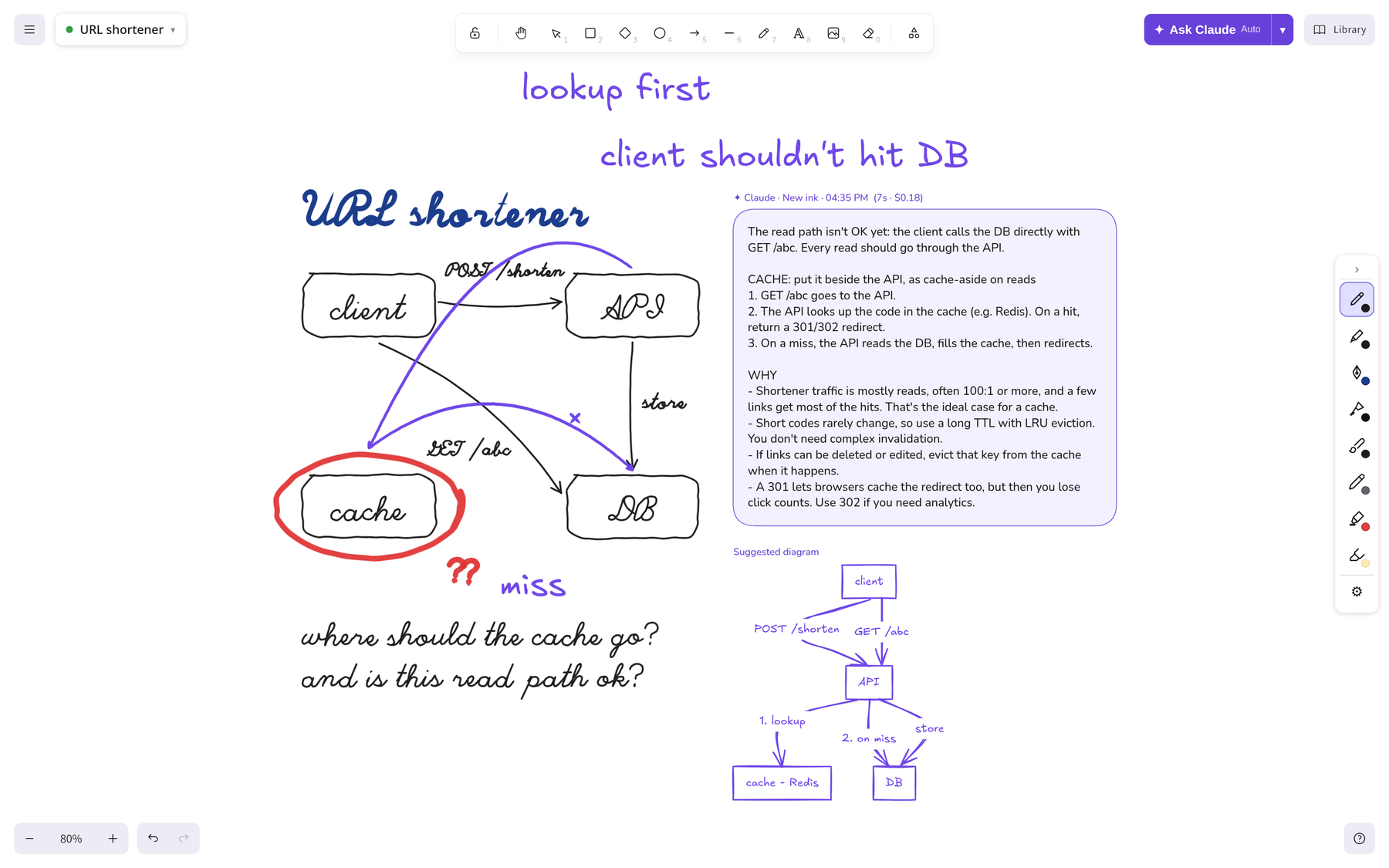
This post is about how it works. The pens are part of it, but most of it is about passing context: what the model gets to see, what it remembers, and how it answers.
pens first, because otherwise I won’t use it
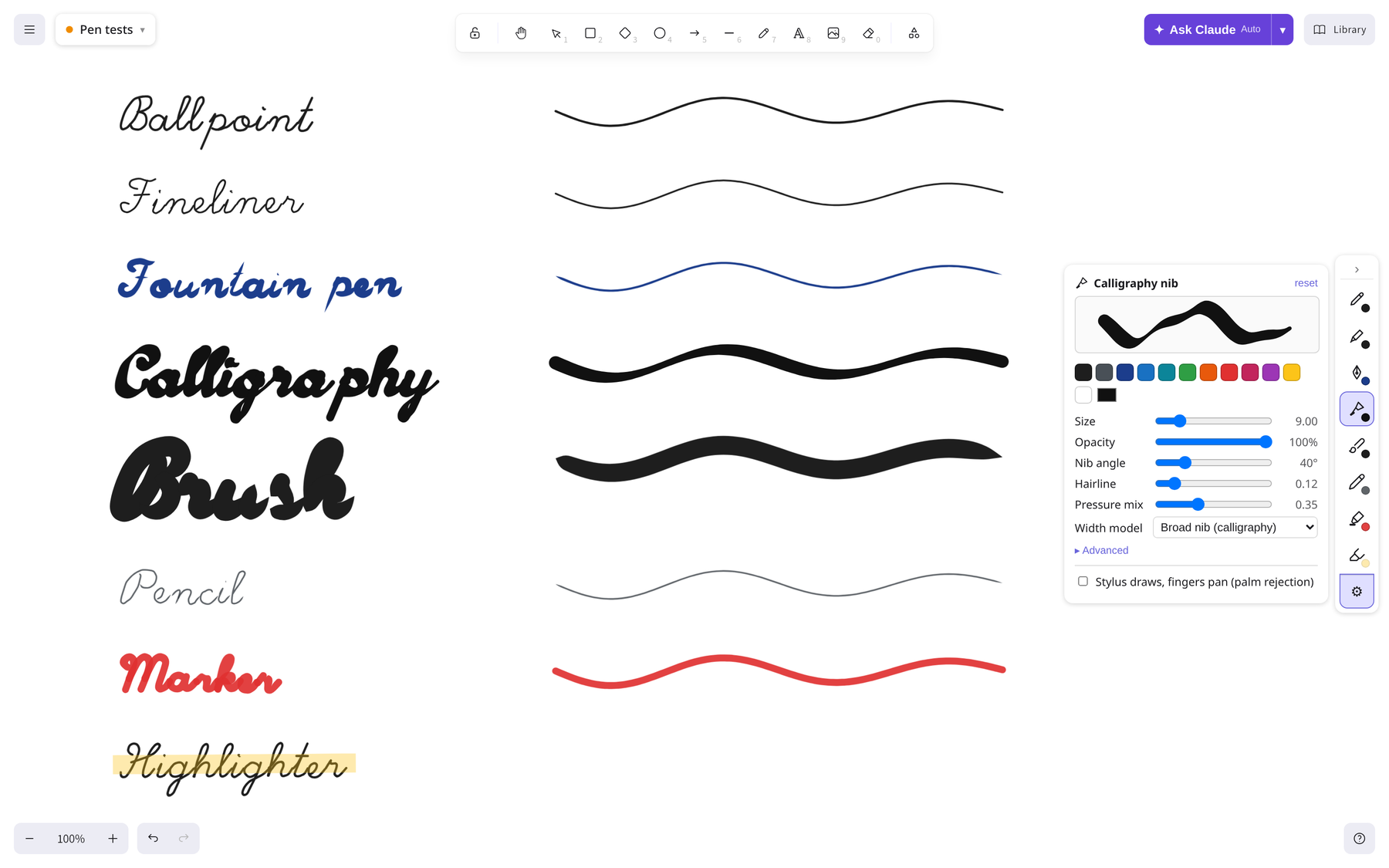
If writing on it feels bad, I’ll go back to paper, and no AI feature will fix that. So the first thing I built was the pens: ballpoint, fineliner, fountain pen, calligraphy nib, brush, pencil, marker and highlighter, on Alt+1…8. They use stylus pressure when there’s a pen tablet. With a mouse, drawing speed can stand in for pressure.
They’re built on perfect-freehand. Excalidraw already uses it for freedraw, but with one fixed style. A small postinstall script patches Excalidraw’s renderer to call a hook, globalThis.__penOptions(element, defaults), so each stroke can carry its own pen settings in customData.pen (thinning, taper, easing, nib angle and so on). Strokes are still native Excalidraw elements. Select, move, erase, undo and export all just work, and a fountain-pen stroke still looks like one after you reload the board.
The calligraphy nib was the fun one. Its width follows the direction of the stroke relative to the nib angle, like a real broad-edge nib. I spent way too long tuning it, and I have no regrets :)
auto mode: what should Claude respond to?
The first real question is scope. When I press Ctrl+Enter, what am I asking about? The whole board might hold three days of notes. The last stroke alone is too little.
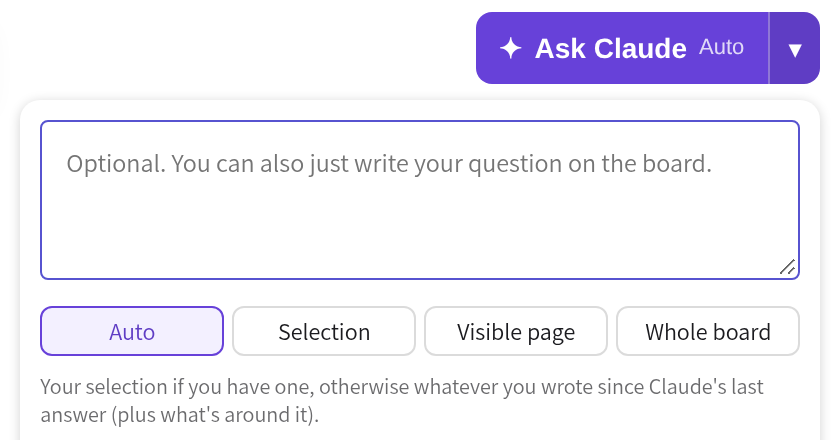
There are four scopes: Selection, Visible page, Whole board and Auto. Auto is the default, and the one I use almost all the time:
 Is anything selected?
     │
     ├── Yes ──► respond to the selection
     │
     └── No ───► anything new since Claude's last answer?
                     │
                     ├── Yes ──► respond to the new ink
                     │
                     └── No ───► fall back to the visible page
“New” is simple. Every card Claude writes stores when it was asked. Anything I added or edited after the latest of those counts as new ink. So the loop is: write a question by hand, press Ctrl+Enter, read the answer, write the next thing, press Ctrl+Enter again. No selecting, no typing. If I want to ask about something older, I circle it and add a note, and that becomes the new ink.
Here’s what that looks like. Everything on this board is handwritten, including the two questions at the bottom. Nothing is selected, so pressing Ctrl+Enter sends all of it as new ink:
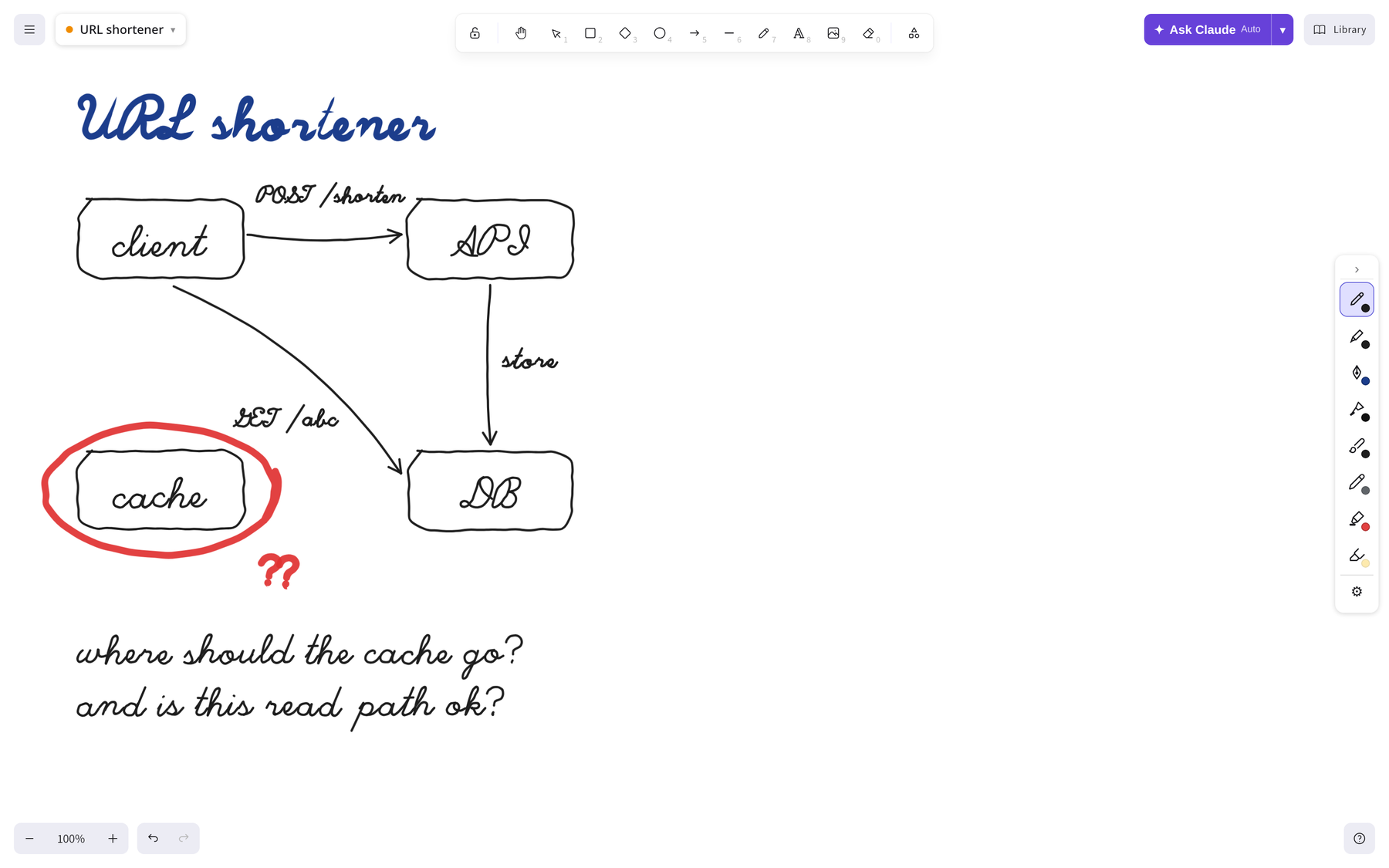
Two details matter here:
- Things are kept together. A selection is expanded so a box never loses its label: bound text goes with its container, and group members and frame children come along too.
- The surroundings come too. Around the focus, the app includes about 700px of the board. This goes in a separate image, marked as context only. “Respond to this” and “this is what’s nearby” are different instructions, and the model needs both.
passing context: what Claude actually sees
Each ask sends a handful of things to the server:
 FOCUS image ──── what I just wrote: respond to this
 CONTEXT image ── what's around it: for context only
 MARKS image ──── the same board, with regions labelled R1, R2… and cards C1, C2…
 Board summary ── typed text, boxes, arrows and what they connect, with [NEW] tags
 Earlier answers ─ every earlier card on the board, nearest first
 Typed question ── optional, from the ▾ menu
The board summary helped more than I expected. To a model, an arrow from “API” to “cache” is a few pixels. In the summary it’s a line of text:
- rectangle containing "API"
- arrow from "API" to "cache" labelled "miss" [NEW]
- 14 freehand pen strokes (6 of them NEW) — handwriting/sketches, read them from the image
Handwriting stays in the images, because the model reads it better than any OCR I’d write. The summary covers what the images can’t make exact: which arrow connects what, and which parts are new. On a fully hand-drawn board like the one above, the whole summary is one line, 165 freehand pen strokes (165 of them NEW), and everything rides on the images.
On the server, the ask runs as headless Claude Code (claude -p) with stream-json input and output. The images go inline as base64 blocks in the user message. The process runs in a project folder you can set per board, so if I draw something about my code, Claude can go and read the file. Most answers don’t need tools, and the prompt says so.
remembering: let a small model pick
After a while a board has a dozen of Claude’s cards on it. If I write a follow-up next to one, the next answer has to know what that card said. But sending every earlier answer every time is slow and expensive, and it makes Claude repeat itself.
So once a board has more than two earlier answers, an ask has two steps:
               New ink on the board
                        │
                        ▼
   1. Haiku picks context
      sees: focus + context images, the board summary,
            each earlier answer (trimmed), its diagram's labels,
            and its distance from the new ink
      returns: { relevant: [ids], followUpOf: id | null }
                        │
                        ▼
   2. The main model answers
      gets: the images, the summary and the full text
            of only the picked answers
The selector gets a JSON schema (--json-schema), no tools, and no saved session. It’s told to include an answer when the new ink points at it, replies to it, asks a follow-up about it, or is on the same topic, and to lean towards including when the handwriting is hard to read. It returns at most five ids. If it fails, the app falls back to the three answers nearest to the new ink. On a whiteboard, distance turns out to be a decent guess for relevance.
followUpOf is the interesting part. If I’m clearly replying to one card, the answer step doesn’t start fresh. It resumes that card’s Claude Code session with --resume <id> --fork-session. Claude gets the whole thread, but the original session stays as it was, so two different follow-ups to the same card don’t get mixed up. If the resume fails, it answers fresh with the picked context instead.
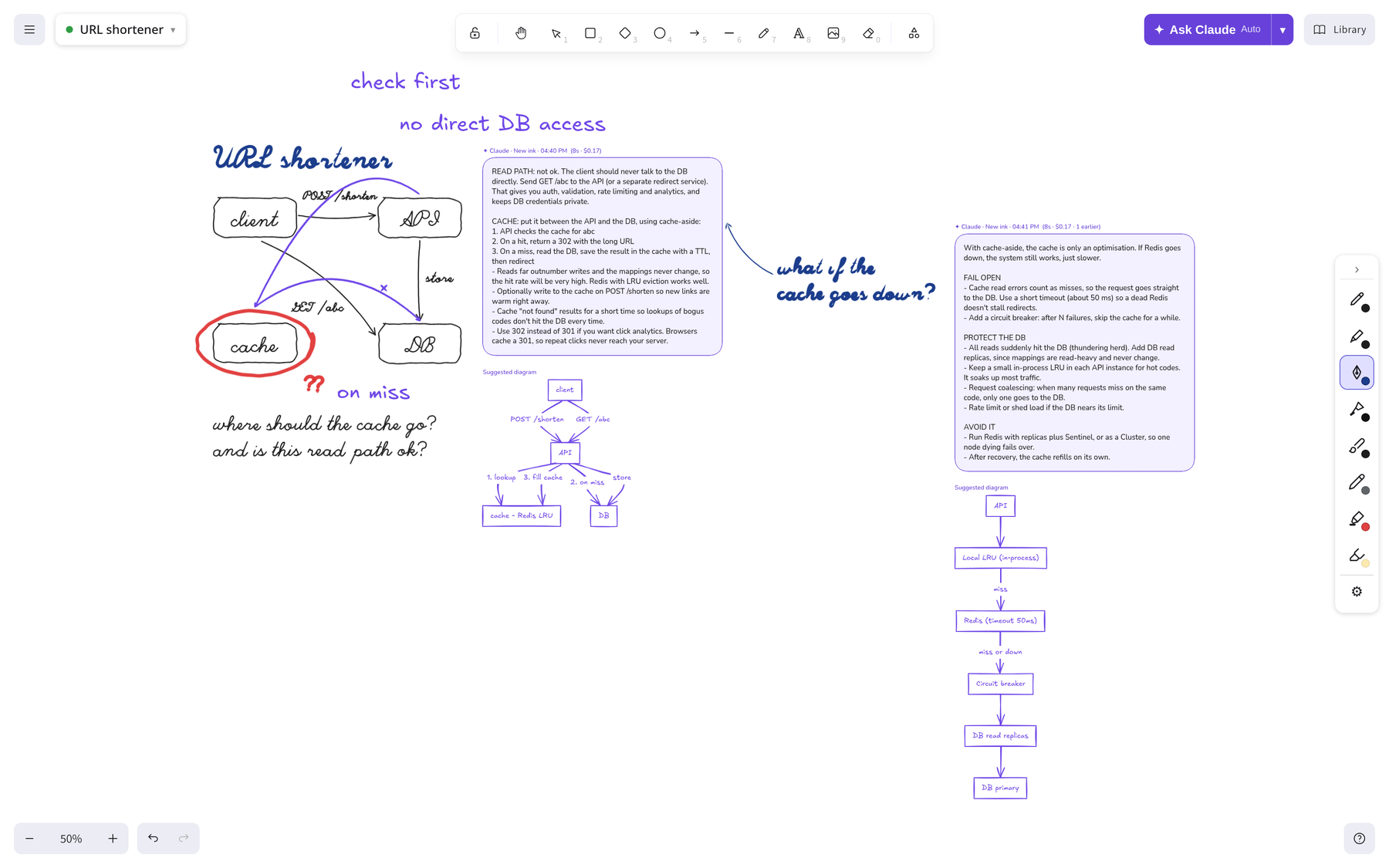
All of this is stored on the board itself. Each card keeps its ask id, session id, engine, project folder and the ids of the answers it used, in Excalidraw’s customData. There’s no separate database, and a board saved and reopened a week later still knows its own history.
answering like a teacher, not a chatbot
The first version replied with a violet card of text, about 120 words in short bullets. The answer streams into a placeholder card that’s put in place before the first token arrives, so the board doesn’t jump around.
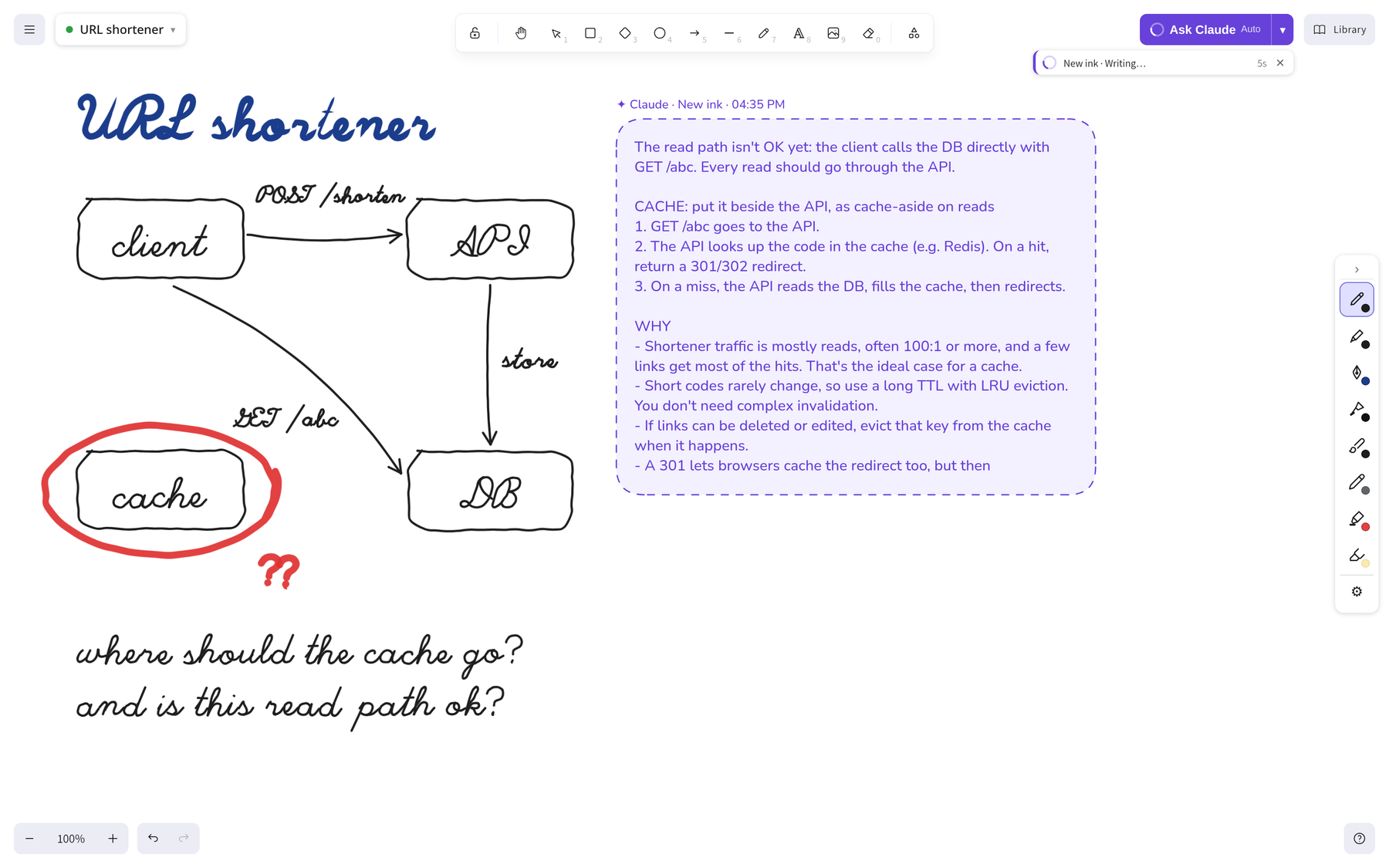
That was useful, but it felt like a chat window glued onto a canvas.
When a person reviews your diagram, they don’t write a paragraph. They grab a pen, circle the problem, put a ✗ next to the wrong step and draw the arrow you forgot. So Claude got a pen too.
That’s what the MARKS image is for. The app groups my elements into regions: an arrowhead joins its arrow, nearby small strokes merge into one word, and nested shapes become one region. Regions are numbered in reading order. Claude’s own cards are labelled C1, C2 and so on. The labels are drawn on a copy of the snapshot, never on the board, and listed in the prompt too. Here’s the one for the board above, with four of its regions:
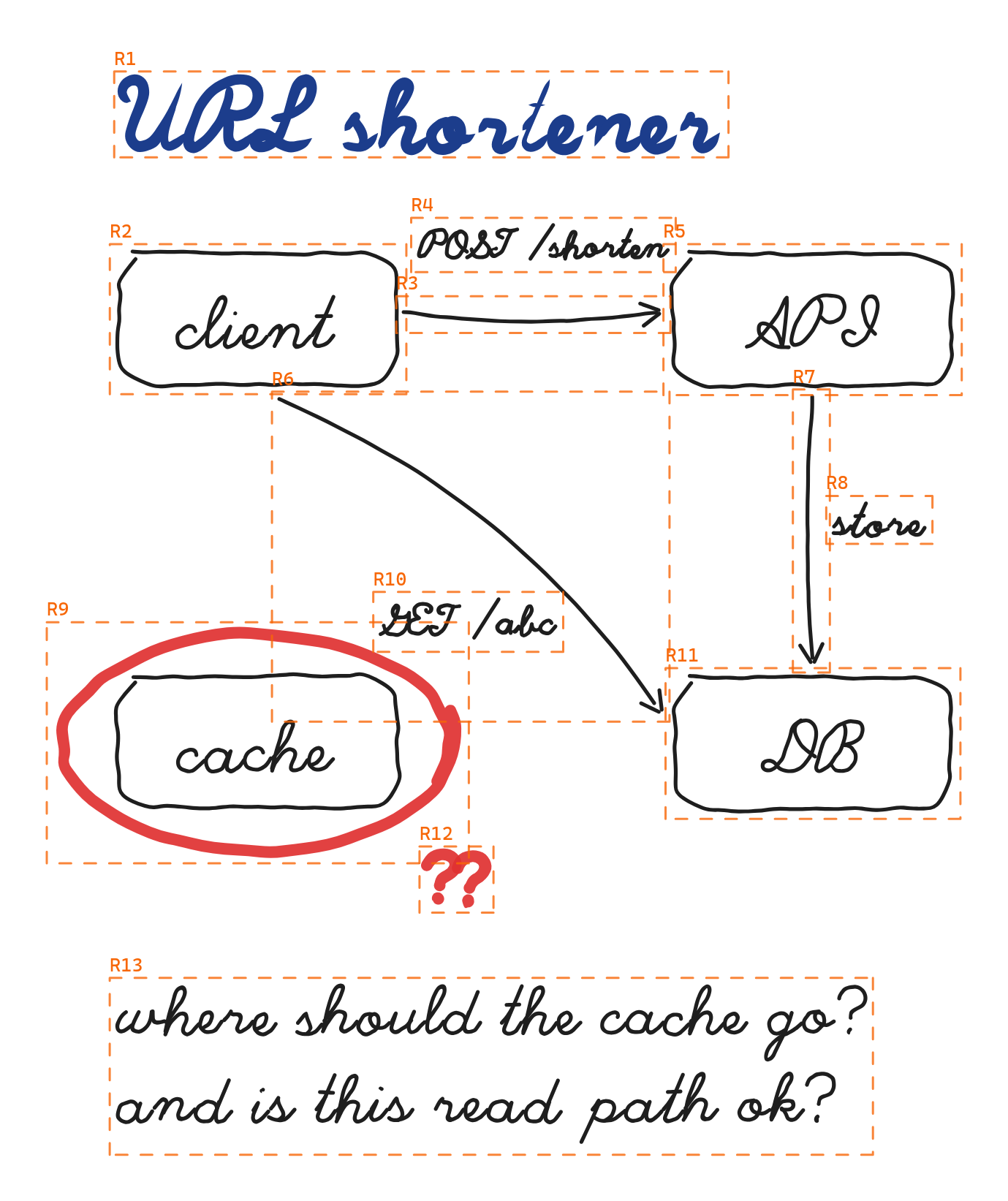
R5: handwriting/sketch [NEW]      ← the API box
R6: pen line/arrow [NEW]          ← the client → DB read
R9: handwriting/sketch [NEW]      ← the circled cache
R11: handwriting/sketch [NEW]     ← the DB box
Claude can then answer with ink commands next to its text:
[
  {"do": "cross", "target": "R6", "note": "client shouldn't hit DB"},
  {"do": "arrow", "from": "R5", "to": "R9", "label": "lookup first"},
  {"do": "arrow", "from": "R9", "to": "R11", "label": "miss"}
]
That’s the exact ink Claude sent back for this board: cross out the direct read, then draw the path a read should take, API to cache, and cache to DB on a miss.
The app turns those into real strokes, drawn with the same pen engine I use. Stroke size matches my own strokes and note size matches my writing. Each stroke is traced out and each note is written letter by letter. The animation frames aren’t saved or added to undo history. Only the final ink is, in one undoable step. Marks go on their own layer (Alt+I hides it), and notes go in free space.
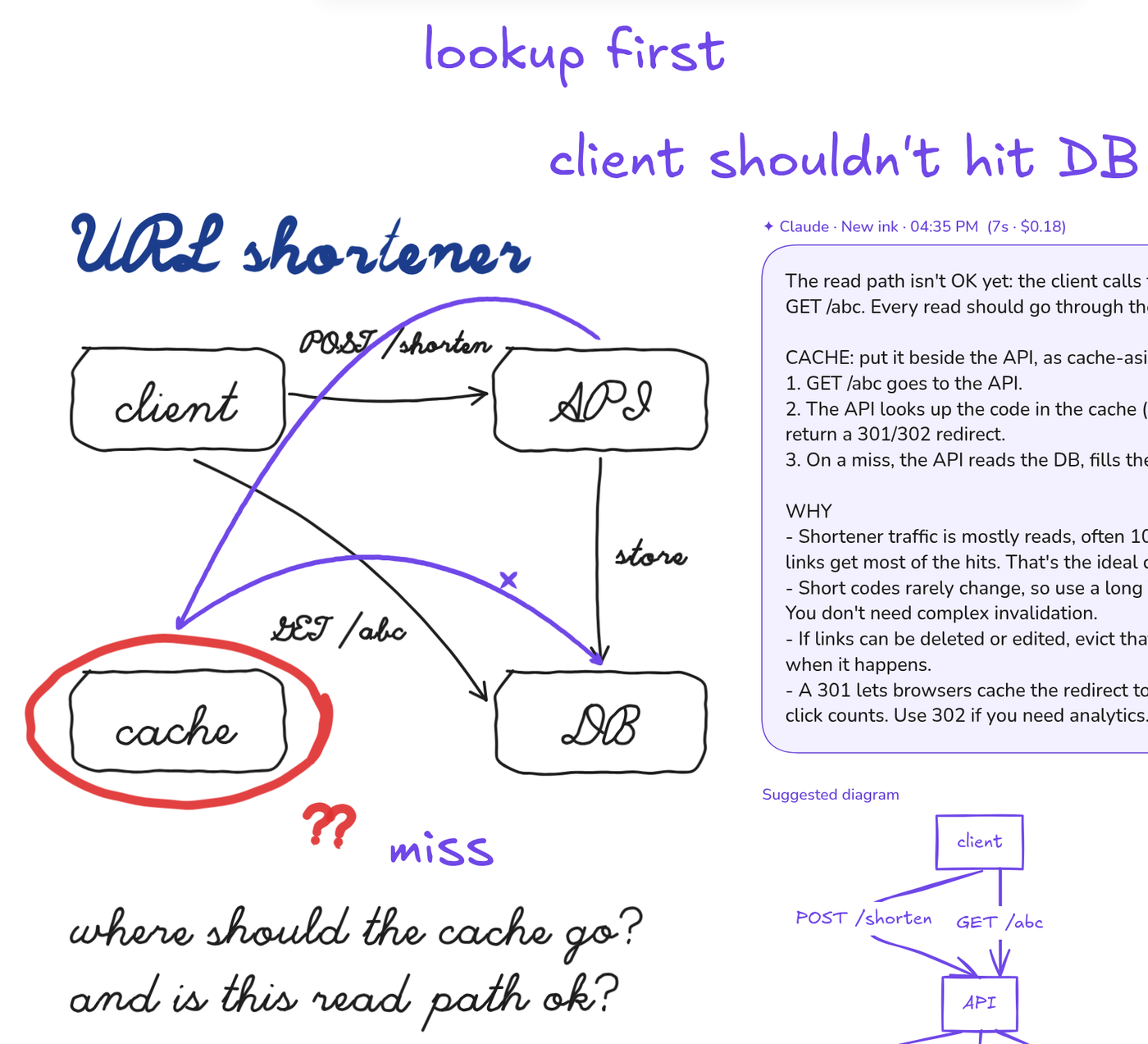
I like this split a lot. The model decides what to point at, because it’s good at that. The app decides how the stroke looks and where it goes, because it’s good at that. If I asked the model for raw coordinates, it would miss by just enough to look broken.
diagrams that draw while you watch
When I’m designing a flow, Claude sometimes suggests a corrected diagram. It writes Mermaid inside a <diagram> tag, and the app converts it to Excalidraw elements in the same hand-drawn violet.
- It streams. Each time another full line of Mermaid arrives, the diagram under the card is redrawn. You see it grow node by node. A half-written diagram that doesn’t parse yet simply keeps the last good version on screen.
- It picks the cleanest layout. Mermaid-to-Excalidraw can overlap labels, especially with subgraphs or long edge labels. So for the final diagram, the app tries a few variants (as written, shorter edge labels, flattened subgraphs, top-down, left-right). It scores each one for overlapping labels, overlapping shapes, crossing arrows and arrows running through text, and keeps the lowest score.
the boring bits I’m glad I did
- Placement. Every card, note and diagram goes through one
findFreeSpotfunction. It prefers the right of what you wrote, then below, then left, then above, and slides outward until nothing overlaps. Claude’s answer never covers my writing. That rule mattered more to me than anything else. - Status you can see. While it works, the card shows what Claude is doing (“Picking relevant context…”, “Reading src/log.rs…”), with a timer and a ✕ that kills the process.
- A fallback when Claude is out of budget. If Claude Code reports a usage limit, the same ask goes to
codex execwith the same images, regions and prompt. Claude is skipped until the reset time it reported, and those cards are labelled as Codex so I always know who answered. - Everything is a file. Boards are plain
.excalidrawfiles. Each ask saves its snapshots, prompt and result indata/asks/<id>/. When an answer surprises me, I can open the exact images and prompt it was given. Most “why did it say that?” moments turned out to be “oh, it never saw that part.”
what I took away
Going from “chat with a model” to “draw with a model” was less about the model and more about everything around it:
- What to show it: the focus, its surroundings, and a typed summary of the structure.
- What to remember: a small model picks the few earlier answers that matter, and real follow-ups continue a fork of their thread.
- How it answers: ink and placement, so the reply lives with the content it’s about.
If you think with a pen too, I’d love to hear how you’d want a model to talk back to you on a page. Happy drawing! :)
FWIW - The project will be open sourced soon! :)