Vaayu part 12: code tours
Contents
Part 12 of the Vaayu series, the second of three posts on the workflows I built Vaayu for. Part 11 was about telling code what’s wrong with it. This one is the reverse: code explaining itself to you.
why this matters
The fastest way to learn a codebase is to have someone who knows it sit next to you and say: “start here. This function reads the key. It calls this one, over in buffer.rs. See this line? That’s why the cache works.” Ten minutes of that beats an afternoon of reading.
That person isn’t always available. And today there’s a new version of the problem: an agent just wrote 800 lines across nine files, and you are the one who has to understand them before you can review them. The code is growing faster than people can read it.
Documentation doesn’t solve this, because docs are written next to the code, not on it, and they drift the moment the code changes. What I wanted was the “sit next to you” walkthrough, saved as a file, that:
- opens the real files at the real lines, in the editor,
- explains each step in prose, with highlights and arrows on the code,
- notices when the code has moved and follows it,
- and can be drafted by an agent and then corrected by a person.
That’s a code tour.
![:tour visuals opens step 1 with highlighted lines and labelled annotations, ]h moves between highlights, ,vf shows the Flow view of connections, and ]t goes to step 2](/assets/blogs/vaayu/tour.gif)
the format
Vaayu reads .tours/*.tour files in the CodeTour JSON format, which started as a VS Code extension. A tour is a title and a list of steps; a step is a file, a line range, and a Markdown description:
{
  "title": "One character: input to buffer",
  "steps": [
    {
      "file": "src/insert.rs",
      "line": 369,
      "endLine": 373,
      "pattern": "fn insert_char(ed: &mut Editor, c: char)",
      "description": "Insert mode passes the typed character and cursor position to the buffer, then advances the cursor."
    }
  ]
}
Using an existing format means tours written for VS Code work in Vaayu, and the other way round for the basic fields. Vaayu adds optional fields under a vaayu key, which other tools ignore:
"vaayu": {
  "title": "Pass the character to its owner",
  "annotations": [
    {"id": "input", "line": 371, "pattern": "ed.buf_mut().insert_char(line, col, c);",
     "label": "Insert at the cursor"},
    {"id": "rope", "file": "src/buffer.rs", "line": 920, "endLine": 929,
     "pattern": "pub fn insert_char(&mut self, line: usize, col: usize, ch: char)",
     "label": "Mutate the rope"}
  ],
  "connections": [
    {"from": "input", "to": "rope", "label": "Calls Buffer::insert_char with the character and position"}
  ],
  "takeaway": "Input handling delegates document mutation to Buffer."
}
titleandtakeaway: a heading for the step, and the one thing to remember.annotations: numbered markers on specific lines, drawn as gutter numbers, a tinted range and an inline label. They can point into other files.connections: arrows between annotations (“this calls that”). The Flow view (,vf) shows them as a list you can follow.diff: either an illustrative before/after snippet, or a real git comparison (base→target, where the target can be the unsaved buffer). The Diff view (,vd) shows it.
(That example is a shortened version of the real examples/visuals.tour in the repo, which walks through the code from part 1.)
anchors: tours that don’t rot
CodeTour steps point at line numbers. Add an import at the top of the file, and every step in it points one line too high. That’s the same problem as review comments in part 11, with the same answer: point at content, not just a line.
A step or annotation can have a pattern (text on the line), a context (text on the line before, to tell repeated lines apart), and an endPattern (text on the last line, for when the code inside the range changes length). Resolving one looks like this:
pub fn resolve_location(lines: &[&str], location: &TourLocation) -> ResolvedLocation {
    let authored = location.line.saturating_sub(1);
    let mut start = authored.min(last);
    let mut warnings: Vec<String> = Vec::new();
    if let Some(pattern) = location.pattern.as_deref().filter(|p| !p.trim().is_empty()) {
        let matches: Vec<_> = lines.iter().enumerate()
            .filter(|(i, text)| {
                text.contains(pattern)
                    && location.context.as_deref()
                        .is_none_or(|context| *i > 0 && lines[*i - 1].contains(context))
            })
            .map(|(i, _)| i)
            .collect();
        if let Some(nearest) = matches.iter().min_by_key(|i| i.abs_diff(authored)) {
            start = *nearest;
            if matches.len() > 1 {
                warnings.push("ambiguous anchor; nearest authored location used".into());
            }
        } else {
            warnings.push("anchor not found; authored line used".into());
        }
    }
    // keep the authored span length; if there's an endPattern, find the end by content
    // ...
}
The important part is the warnings. When an anchor is ambiguous or missing, the tour still opens (at the nearest or the authored line), but it says so in the step’s header. And annotations whose targets can’t be resolved confidently don’t get arrows. A tour arrow pointing confidently at the wrong line is worse than no arrow, for the same reason a review comment that silently jumps is worse than one that says “check me”.
:tourcheck (,vk) validates a whole tour in the background: missing files, unresolved or ambiguous anchors, broken connections, comparison sources that don’t exist. Run it before you walk someone through a tour, and drift shows up as a warning instead of a quietly wrong arrow. (It’s an editor command today; a headless vaayu --tourcheck for CI would be a nice addition.)
Anchors are resolved once and reused across steps until the buffer changes. When you edit, stale indicators hide and re-resolve after 180 ms of idle time (part 4’s pattern again).
reading a tour
:tours lists the project’s tours with their step counts, health (empty, invalid, missing files) and where you left off. Enter resumes; r starts over.
During a tour, the screen has two panes: the source at the step’s lines, with its annotations, and the lesson, the step’s description rendered as Markdown (part 8, so lessons can include images and Mermaid diagrams).
| Key | Action |
|---|---|
]t / [t | next / previous step |
]h / [h | next / previous highlight in this step (even in other files) |
K | switch focus between source and lesson |
,vd / ,vf / ,vS | Diff / Flow / back to Source |
Ctrl-O | back from Diff or Flow to exactly where you were in the source |
,vm | rendered ↔ raw lesson (raw is editable scratch) |
,vy / ,vY | copy this step / the whole tour as JSON |
The lesson pane is a real buffer. You can scroll it, search it, and even type notes into it; those are scratch edits that last for the step and never modify the .tour file.
the UX audit
I want to show this part because it changed how I build UI.
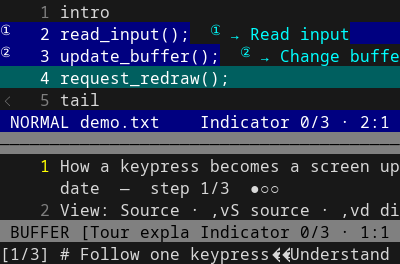
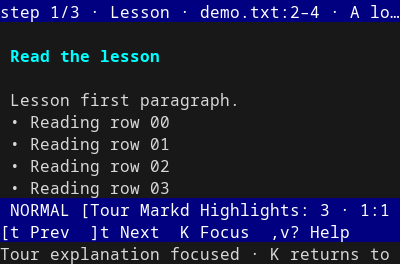
The first version of tours worked, and the tests passed. Then I ran a proper audit: a PTY driver that opened tours at four terminal sizes (40×12, 80×24, 120×30, 180×50), stepped through every view and state, and captured 74 frames of actual terminal cells. Looking at them found ten problems the tests didn’t:
- Your notes vanished. Typing a note into the lesson and then opening the Flow view regenerated the lesson buffer and silently threw away what you’d typed.
- Missing files looked normal. A step pointing at a deleted file opened an empty buffer (the editor’s normal “new file” behaviour) and looked like a perfectly fine step. Worse, after visiting it,
:tourcheckstopped reporting the missing file. - At 40×12, there was no lesson. The title and controls filled the pane; the actual text was below the fold.
- Scroll the lesson, lose your place. The step counter and controls were part of the scrolling text, so they scrolled away.
- Raw Markdown first. Lessons opened as raw text with line numbers.
- …and five more, from multiline descriptions flattened into one row in the step picker to the last step saying “End of tour” and nothing else.
| Before the audit | After |
|---|---|
 |  |
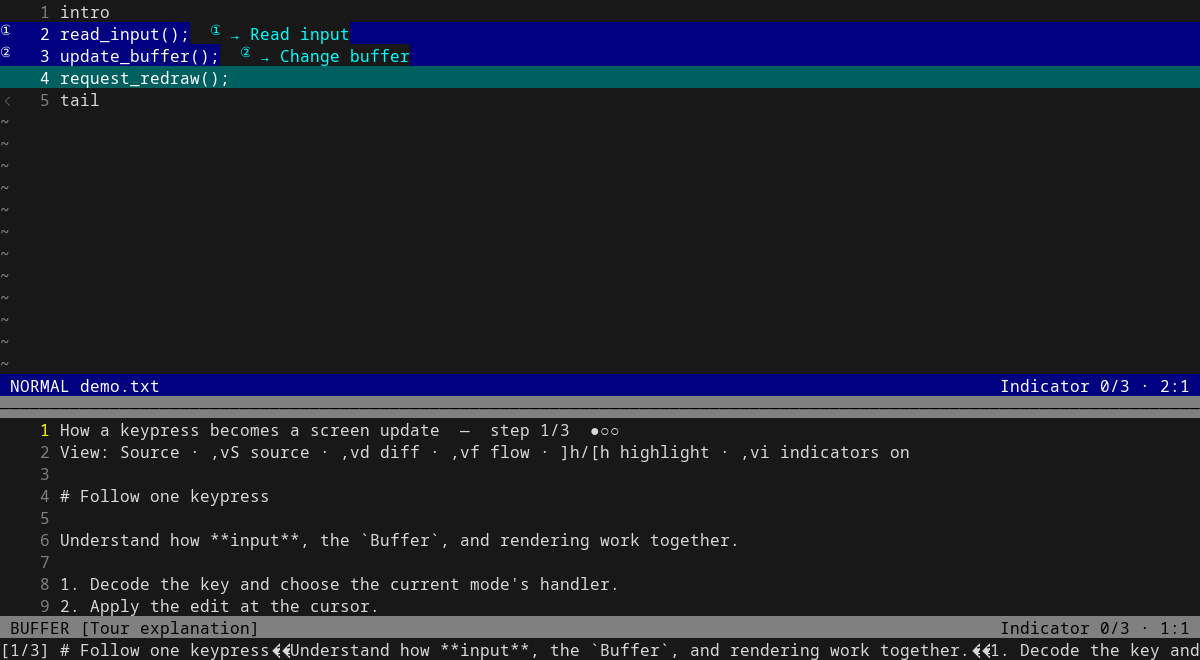 | 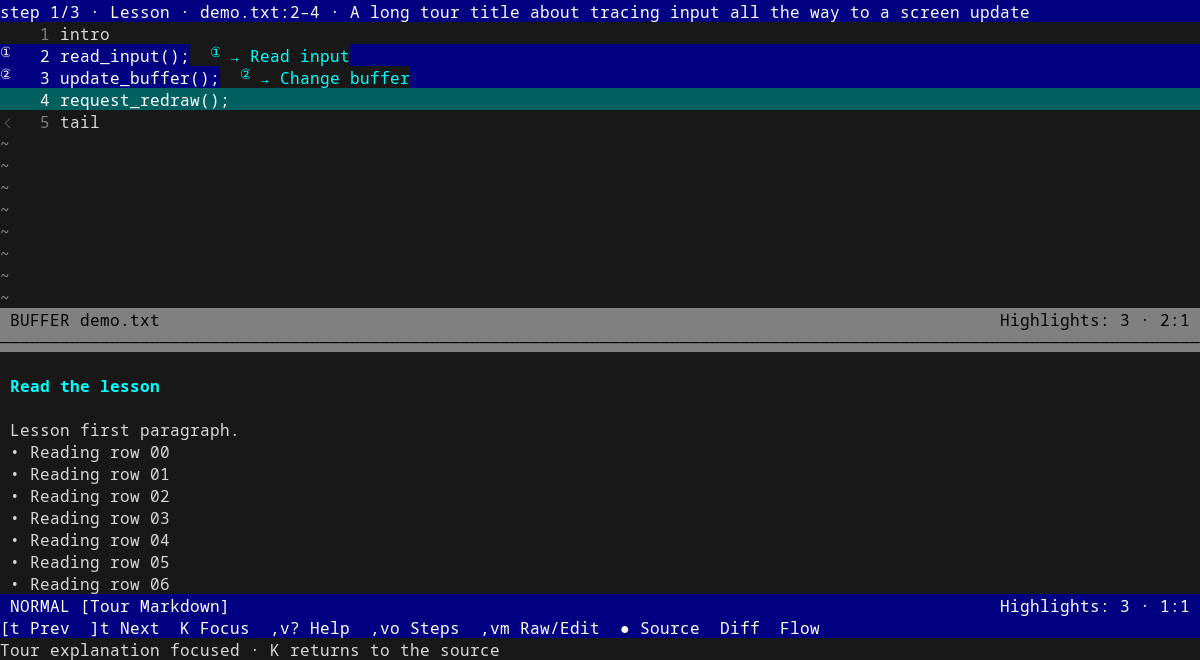 |
Frames from the audit’s own captures, at 40×12 and 120×30.
The fixes, in short: the lesson body is separate from the generated chrome, so view changes keep your notes and your scroll position; tours check that files exist before opening them and show a read-only recovery view (Retry, Skip, Edit definition); the layout adapts (a single focused pane up to 16 rows, a 55/45 split normally, side by side at 140+ columns); progress and actions are pinned outside the scrolling text; lessons open rendered.
The lesson I took away: tests check what you thought of; looking at real frames finds what you didn’t. Every UI feature in Vaayu now gets a PTY capture pass at several sizes before I call it done.
letting an agent write the first draft
Writing a good tour by hand takes time. Reading code and explaining it is exactly what coding agents are good at. So:
:tournew nameopens a small buffer where you describe the tour you want (“walk through how a keypress becomes a frame, for someone new to the codebase”).:toursavesends that to your agent (part 13) along with the authoring schema, with instructions to use unique patterns as anchors and to add visuals only when they help.- The agent writes a
.tourfile. It’s an ordinary project file: you review it, edit it, and commit it like code. :tourcheckcatches anchors the agent got wrong.:tourexplain(,vx) goes the other way: on any step, ask the agent to explain the code there in more depth, with the step’s annotations included as context.
This is the combination I find most useful: the agent does the first 80% quickly, and anchors plus validation make sure the remaining 20% is visibly flagged instead of silently wrong.
why tours matter more now
When an agent hands me a large change, this is the loop tours are built for: ask it for a tour of what it did, check the tour (:tourcheck), walk through it, and leave review comments (part 11) as I go. The tour tells me where to look and in what order; the review captures what I think. Together they turn “read 800 lines” into a guided path.
vs the alternatives
- VS Code’s CodeTour extension: where the format comes from, and great. It’s GUI-only, and its steps point at line numbers (or text patterns), without annotations, connections or diffs inside a step.
- codetours.nvim (and similar Neovim plugins): what I used before, for playing CodeTour files inside Neovim. It plays the standard format, so none of the step visuals above, and no agent authoring. In fairness, it can record a tour by adding stops as you go, which Vaayu still can’t; that’s on the parity list.
- Helix / Zed: no equivalent.
- Docs, wikis, ADRs: still needed for the “why”. But they live away from the code, so nothing tells you when they’ve drifted.
:tourcheckdoes, for tours.
what I’d do differently
- I’d have done the PTY capture audit before building more views. Several of the findings (lost notes, hidden progress) only appeared when features that were each fine on their own were combined.
Next, part 13: the agent that wrote those tours, and how it lives next to your code.