Vaayu part 13: an AI agent beside the code
Contents
Part 13 of the Vaayu series, the last of three posts on the workflows I built Vaayu for. Reviews and tours both hand work to an agent. This post is about how the agent lives in the editor, and why it’s a terminal and not an API.
why this matters
Here’s how most people use an AI coding agent today: select some code, copy, switch to the agent, paste, type “fix this”, switch back. What got lost on the way?
- which file it was, and which lines,
- where your cursor was,
- the diagnostics the language server is showing on those lines,
- what you changed since the last commit,
- what other files you have open.
The agent then spends its first few tool calls rediscovering all of that, or guesses. The editor already knows every one of those things. So the editor should build the context, and the agent should receive it in a shape it can’t misread.
The second half of the idea: the agent should be the real agent. Claude Code, Codex, or whatever CLI you like, with all of its own tools, permissions, sessions and slash commands. Not a lookalike chat panel built on an API, which would always be a version behind the real thing.
the design: a PTY, not an API
:ai (or ,ca) opens your agent’s CLI in a right-hand sidebar. Under the hood it’s the same PTY machinery as :terminal (part 7): a pseudo-terminal, a reader thread, a vt100 screen.
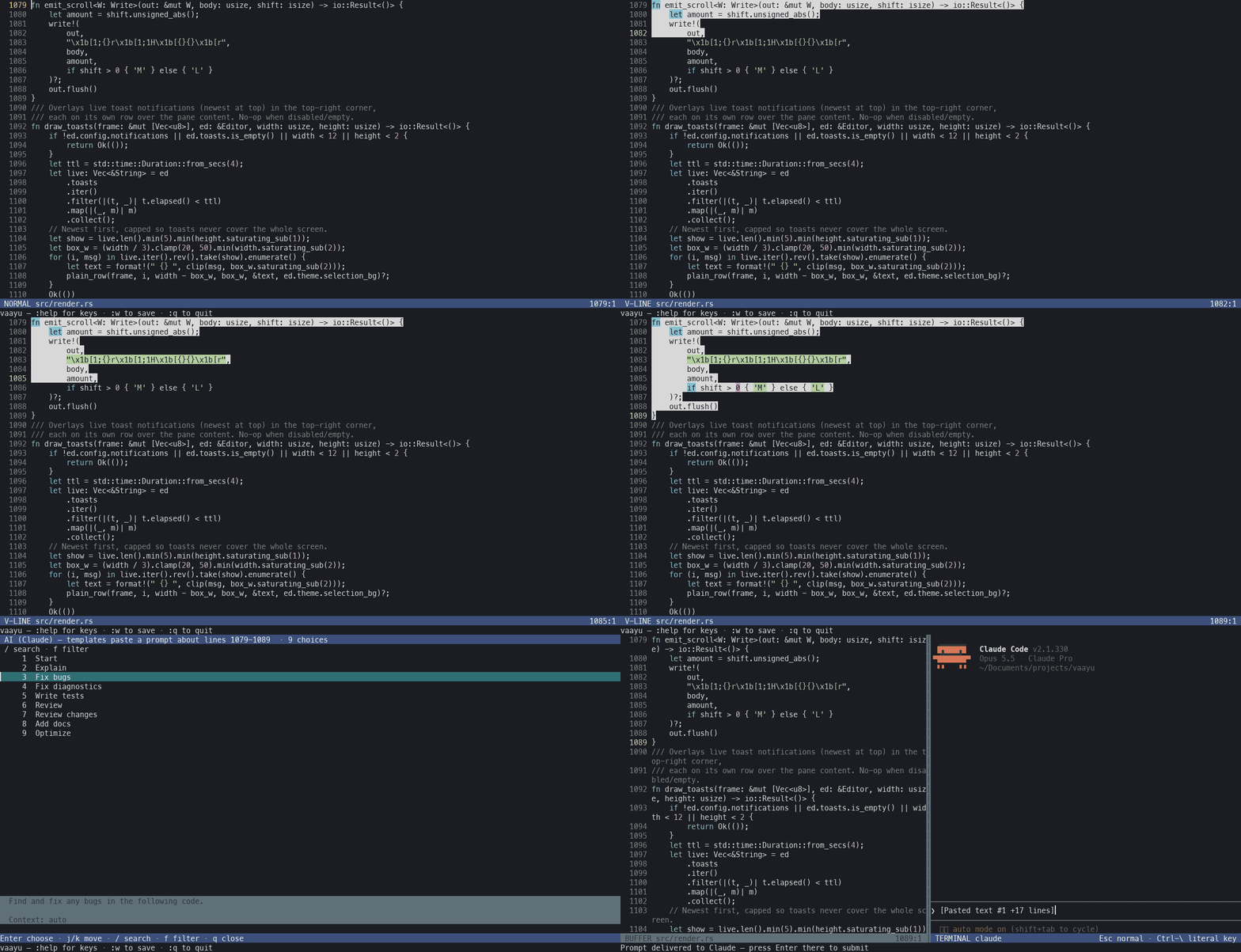
V over a function, ,ca, Explain. Claude Code starts in the sidebar and the prompt arrives once it’s ready, unsent, until I press Enter.
Which agent runs is configuration:
ai_agent = "claude"     # the default
agent_commands = { codex = ["/absolute/path/to/codex"], custom = ["/path/to/agent", "--interactive"] }
:claude, :codex and :agent <name> open a specific one directly, independent of the default. :agents lists running sessions and lets you reattach.
What this buys:
- Every feature of the real CLI. Its tools, its file editing, its permission prompts, its session history. When the CLI ships something new, Vaayu has it the same day.
- No API keys in the editor. Vaayu never talks to a model. The CLI is already logged in.
- Any agent. If it runs in a terminal, it works. Switching between Claude and Codex is one config line.
What it costs: the editor can’t read the agent’s answer as structured data. It can only type into it. For the review loop in part 11, where the editor needs structured replies, a separate non-interactive review_command is used instead.
building the context
When you send a prompt, Vaayu builds it from three parts: your instruction, the code, and where you are. From src/context.rs:
pub(crate) fn build_ai_prompt(
    &mut self,
    instruction: &str,
    context: AiContext,
    selection: Option<AiSelection>,
) -> Result<String, String> {
    let code = match (context, selection) {
        (AiContext::Auto | AiContext::Selection, Some(sel)) => Some(self.ai_selection_context(sel)?),
        (AiContext::Selection, None) => {
            return Err("This prompt needs a Visual selection or a line range".into())
        }
        (AiContext::Auto | AiContext::File, _) => Some(self.build_context("file", None)?),
        (AiContext::Diff, _) => Some(self.ai_diff_context()?),
        (AiContext::Buffers, _) => Some(self.ai_buffers_context()?),
        (AiContext::None, _) => None,
    };
    let (line, col) = self.cursor();
    let rel = self.context_rel_path();
    let mut out = instruction.to_string();
    if let Some(code) = code {
        out.push_str("\n\n");
        out.push_str(&code);
    }
    out.push_str(&format!("\n\nCursor: {rel}:{}:{}", line + 1, col + 1));
    // Diagnostics are optional context.
    if context != AiContext::None {
        if let Ok(diags) = self.build_context("diagnostics", None) {
            out.push_str("\n\n");
            out.push_str(&diags);
        }
    }
    Ok(out)
}
So a “Fix diagnostics” on a selection arrives at the agent looking like this:
Fix the diagnostics reported for the following code.

File: src/render.rs:1079-1090
```rust
fn emit_scroll<W: Write>(out: &mut W, body: usize, shift: isize) -> io::Result<()> {
    ...
}
```

Cursor: src/render.rs:1083:9

Diagnostics: src/render.rs
1083:9: Error: mismatched types ...
Every block is labelled (File:, Cursor:, Diagnostics:) and fenced with its language. The path is relative to the project, with line numbers. The agent never has to guess what it’s looking at, and it can open the file itself to see more.
The context options, as flags on :ai <instruction>:
| Flag | Sends |
|---|---|
| (none, “auto”) | the selection if there is one, otherwise the file |
--selection | exactly the selection (character-exact for a characterwise Visual selection) |
--file | the whole file |
--diff | this file’s uncommitted changes |
--buffers | every open file |
--none | just your instruction and the cursor |
:ai with no instruction opens a picker of templates: Start (just open the agent, send nothing), Explain, Fix bugs, Fix diagnostics, Write tests, Review, Review changes (which sends this file’s uncommitted diff), Add docs and Optimize. You can add or override templates with [[ai_prompts]] in the config.
the hard part: pasting into a program that’s still starting
Here’s a bug that took more than one try to get right.
If the agent sidebar is already open, sending a prompt is easy: paste it in. But if it isn’t, :ai has to start the CLI and then paste. The first version pasted immediately. Claude Code’s interface was still starting up, and the prompt landed garbled: half of it before the input box existed, half after.
Attempt 1 (September 24): queue the prompt for a freshly started session and deliver it when the CLI “looks ready”: it has printed something, and at least 800 ms have passed since it was started. Give up waiting after 3 seconds.
That worked on my machine. It didn’t work with a slow claude launcher (the kind a corporate setup wraps with auth, proxies and setup steps). Such a launcher prints a line or two early, so “drew something, 800 ms passed” fired while it was still in the middle of starting up, and it can take far longer than 3 seconds to draw the real prompt.
Five days later the question changed from “has it printed anything?” to “has it stopped printing?”: a quiet window long enough to sit through a launcher’s brief pauses, and a much more generous cap. The cap still has to exist, because some CLIs never go fully quiet (an animated status line, for example):
const AGENT_SETTLE: Duration = Duration::from_millis(1500);
const AGENT_MAX_WAIT: Duration = Duration::from_millis(60_000);

// in flush_pending_agent_send, called on every pass through the main loop:
let rev = pty.output_revision();
if rev != p.last_rev {
    p.last_rev = rev;
    p.last_change_at = now;            // the CLI drew something: reset the quiet timer
}
let saw_output = rev > 0;
let quiet_for = now.duration_since(p.last_change_at);
let waited = now.duration_since(p.spawned_at);

// Ready once the child has drawn something and then gone quiet (sitting
// at its prompt), or after the hard cap regardless.
let ready = (saw_output && quiet_for >= AGENT_SETTLE) || waited >= AGENT_MAX_WAIT;
output_revision is bumped by the PTY’s reader thread whenever the program writes anything. So “ready” means: the program has drawn something, and has been silent for 1.5 seconds. That’s what a TUI looks like when it’s sitting at its prompt waiting for you.
The edge cases around it matter just as much:
- Two prompts while it’s starting are joined, in order, into one delivery, instead of racing each other.
- The sidebar is closed while waiting: the queued prompt is dropped, and you’re told.
- The CLI exits before it’s ready (not logged in, wrong path): the prompt is copied to the
+register so you don’t lose what you wrote, with a message saying why. - An exited agent shows
exitedin its statusline and in:agents, and the next:aistarts a fresh one, instead of silently pasting into a dead process (that was a real bug, fixed in November).
bracketed paste, and who presses Enter
A multi-line prompt typed into a terminal program is ambiguous: is each newline “submit”? Terminals solved this long ago with bracketed paste: wrap pasted text in ESC[200~ … ESC[201~, and the program knows it’s one paste:
pub fn write_pasted_input(&mut self, text: &str) {
    self.scroll_to_bottom();
    if let Ok(mut writer) = self.writer.lock() {
        let _ = writer.write_all(b"\x1b[200~");
        let _ = writer.write_all(text.as_bytes());
        let _ = writer.write_all(b"\x1b[201~");
    }
}
By default, Vaayu pastes the prompt, focuses the sidebar, and doesn’t press Enter. You read what’s about to be sent, add a sentence if you want, and submit it yourself. ai_auto_submit = true presses Enter for you; ai_focus_on_send = false keeps your focus in the editor. Defaults should be the careful option when the thing on the other end can edit your files.
one agent, many callers
The sidebar is the shared channel for everything AI in Vaayu:
| Caller | What it sends |
|---|---|
:ai, ,ca | your instruction + code + cursor + diagnostics |
,cx | a context picker: file, selection, clipboard, enclosing symbol, diagnostics |
:toursave | a tour request + the authoring schema (part 12) |
:tourexplain | the current tour step’s code and annotations |
| review runs | a JSON packet, via the separate non-interactive review_command (part 11) |
The sidebar is also a full terminal pane: you can scroll its history, search it with /, yank from it with v/y, or capture the whole conversation into a buffer with :termcapture.
vs the alternatives
- sidekick.nvim: the direct inspiration. It runs the agent CLI in a Neovim terminal and sends context to it. Vaayu’s version adds the startup handshake, the context flags, and shares the channel with tours and reviews.
- avante.nvim / codecompanion.nvim: chat UIs inside Neovim that talk to model APIs directly. Very capable, and model-agnostic, but you get the plugin’s agent, not the vendor’s CLI with its own tools and updates.
- Cursor, Zed, VS Code + Copilot: deeply integrated assistants, with inline edits and diffs that a terminal sidebar can’t match. They’re tied to their own UI and (mostly) their own provider and pricing.
- Helix: nothing built in; you run the agent in another terminal and copy-paste.
- Just a second terminal: honestly, the closest alternative. What Vaayu adds is the context: it knows your selection, your cursor, your diagnostics and your diff, and sends them in a form the agent can’t misread.
what I’d do differently
I’d have treated “is the other program ready?” as a protocol question from day one, instead of a timing one. A quiet-output heuristic works, but a CLI flag that says “ready for input” would be far better. I’d love for agent CLIs to expose one.
I’d have made the sidebar a full terminal pane from the start. For two months it only showed what fit on the screen; scrolling back through an agent’s answer, searching it and yanking from it arrived on November 20. An agent’s output is something you read, so it should have been as readable as a buffer on day one.
I’d have made the
:aitarget configurable on day one. For its first three weeks,:aiand tours always sent to theclaudesession, even though other agent CLIs could already be configured. Making the target a setting on October 8 was a small change; it should never have needed one.
Next, the last post, part 14: how all of this got built in ten weeks, with an agent in the sidebar the whole time.