Vaayu part 8: pictures in a terminal
Contents
Part 8 of the Vaayu series. A terminal is a grid of characters. This post is about putting real images and Mermaid diagrams in that grid, in a way that still respects splits, scrolling and popups.
I write a lot of Markdown: design notes, READMEs, this blog. And more and more of it has Mermaid diagrams in it, because they’re the easiest way to explain a flow. In Neovim, the usual answer is a plugin like markdown-preview.nvim, which opens a browser tab, and now you’re alt-tabbing between your editor and Chrome to read your own notes. I had image.nvim in my config for images, but nothing that drew Mermaid diagrams in the terminal.
I wanted ,mp to show the rendered document in the editor, with the diagrams drawn as diagrams.
examples/mermaid.md in the preview. This capture is from vaayu --web (part 9), which receives exactly the same Kitty graphics bytes as a terminal and draws the placeholders the same way.
step 1: Markdown is the easy part
The preview parses Markdown with pulldown-cmark and lays it out for the pane’s width: headings, bold and italic, nested lists, tables, links, block quotes, and code fences highlighted with the same tree-sitter grammars as the editor (part 5).
Layouts are cached per buffer, width and zoom, so scrolling doesn’t re-lay out the document, and editing one paragraph doesn’t re-render the diagrams in the others.
step 2: drawing diagrams without a browser
Mermaid is a JavaScript library. The normal way to render it is a headless browser, which is the last thing I wanted to start from an editor.
Instead, Vaayu uses Merman, a native Rust implementation of Mermaid’s parser and layout, pinned to an exact version (=0.8.0). It parses the diagram, lays it out, and produces an SVG, which resvg rasterizes into a PNG.
That’s real CPU work, so it follows part 4’s rules:
- one lazy worker thread, started the first time you preview a diagram,
- a 150 ms debounce, so typing inside a diagram doesn’t render it on every key,
- a 3-second cooperative deadline, so a pathological diagram can’t hang the worker,
- stale results are rejected when the source changed in the meantime,
- finished images are cached by (source, theme palette, output size), so the same diagram in a light and a dark theme are two cache entries, and switching back is free.
Limits keep it bounded: 64 KiB of source and 800 parsed items per diagram, 64 cached images or 32 MiB, 16 MiB per PNG. A diagram over budget shows its source and the reason instead. Strict mode means no HTML in labels and no external resources.
step 3: getting pixels into a terminal
Now we have a PNG. How do you show it in a terminal?
The Kitty graphics protocol (Kitty’s own, and implemented to varying degrees by other terminals) lets a program upload an image with an escape sequence and display it. The usual way to display it is “put this image at the cursor”. And that’s where most terminal image tools get into trouble.
An image placed “at the cursor” floats on top of the text grid. The terminal doesn’t know it belongs to a pane. Scroll the text, and the image stays put unless you delete and re-place it. Open a popup over it, and the image draws on top of your popup. Split the window, and it bleeds into the neighbour. Every program that does this ends up re-implementing clipping and stacking for images, and it’s never quite right. (If you’ve used image.nvim, you’ve probably seen an image linger after scrolling.)
Unicode placeholders: images as text
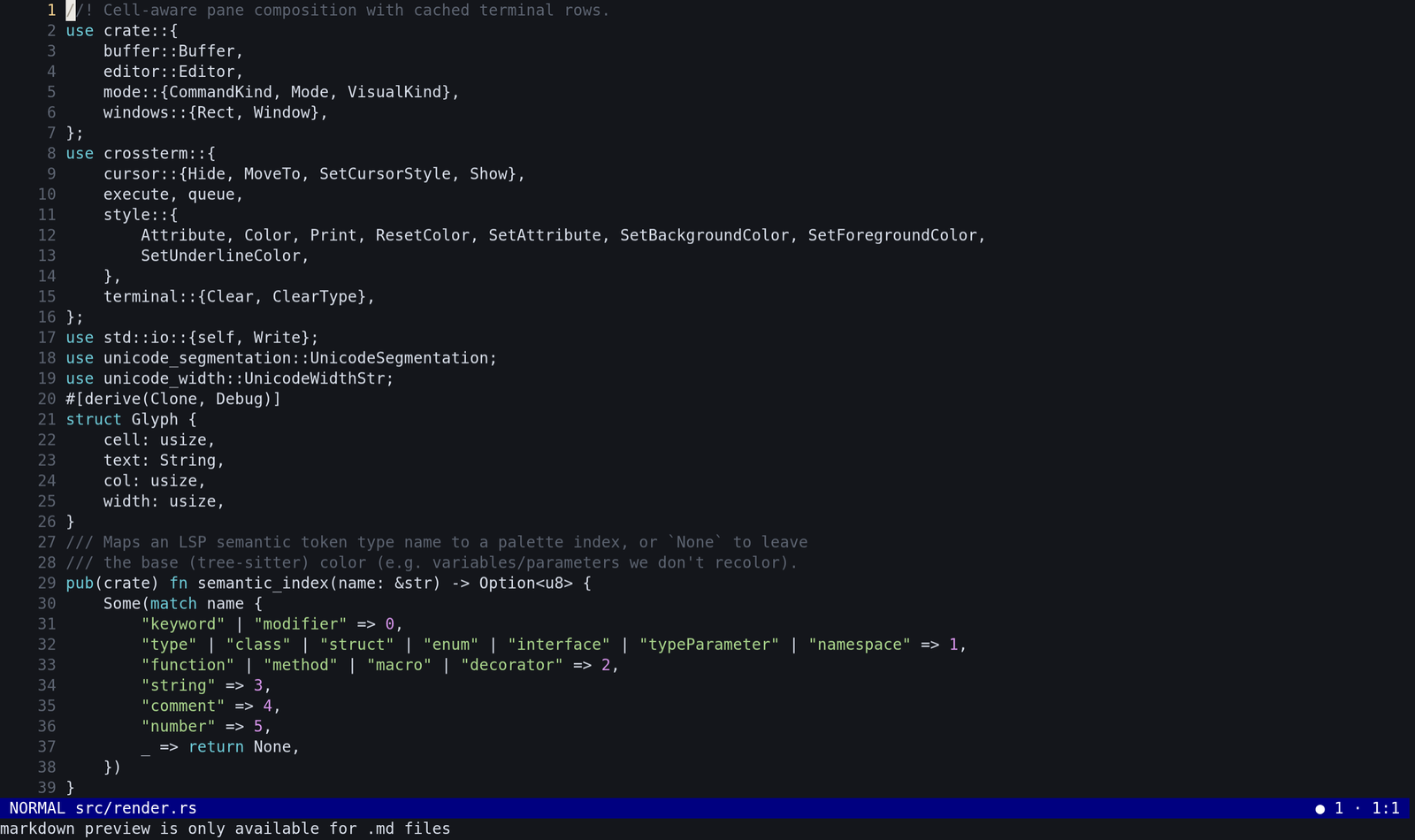
Kitty has a second, cleverer mode. You upload the image once, create a “virtual placement” for it, and then print special characters where you want it to appear. Each cell of the image is the character U+10EEEE (a private-use code point), with two combining marks that say “row r, column c of the image”, and the image id encoded in the text’s foreground colour:
// The image id rides in the foreground colour, the placement id in the
// underline colour.
write!(
    out,
    "\x1b[38;2;{};{};{}m\x1b[58;2;{};{};{}m",
    (cell.id >> 16) as u8, (cell.id >> 8) as u8, cell.id as u8,
    (placement >> 16) as u8, (placement >> 8) as u8, placement as u8
)?;
for &column_mark in DIACRITICS.iter().take(end).skip(left.min(end)) {
    let row_mark = char::from_u32(DIACRITICS[usize::from(cell.row)]).unwrap();
    let col_mark = char::from_u32(column_mark).unwrap();
    queue!(out, Print(format!("\u{10eeee}{row_mark}{col_mark}")))?;
}
The terminal sees those characters and draws the matching slice of the image in each cell.
Why does this matter so much? Because the image is now text. It goes through the exact same pipeline as every other character in Vaayu:
- it’s part of a row, so the row diff (part 3) only rewrites it when it changes,
- a pane only draws the columns that fit, so the image is clipped at the split border for free (see the
skip(left)andtake(end)above), - a popup or the floating terminal draws over those cells like over any text, so it covers the image,
- scrolling moves the rows, and the image moves with them.
There is no “image layer” to keep in sync. That’s the whole trick, and the module’s doc comment says it better than I can:
Image cells participate in the normal row compositor, so scrolling, clipping and overlays are text operations; no floating image can bleed across a pane or dialog.
Vaayu also tracks which images and placements are in use, and frees them on close, resize and exit, so the terminal doesn’t keep a growing pile of PNGs in memory.
when the terminal can’t
At startup, Vaayu sends a tiny probe image (a=q) and waits for the terminal’s reply. If the terminal answers, diagrams are drawn as images with placeholders. Some places skip the probe on purpose: inside tmux or screen (which need negotiated passthrough) and in WezTerm (which acknowledges basic Kitty graphics but doesn’t ship Unicode placeholders yet, wezterm#986). There, automatic mode draws diagrams as Unicode text instead: Merman can lay out many diagram families as box-drawing characters. You can force "kitty" in the config if you know your terminal can do it. And if neither works, the diagram falls back to its source, with a note saying why. The preview never breaks just because the terminal is old.
images in Markdown
The same machinery handles  in your documents. A second lazy worker loads local files (relative to the document) or HTTP(S) URLs with a 5-second timeout, decodes PNG/JPEG/GIF/WebP/BMP/ICO or rasterizes SVG, and hands back a PNG. There are budgets everywhere: 16 MiB per input or output image, 128 MiB of decode allocation, at most 2400×3300 pixels out, 64 cached images or 32 MiB. GIFs show their first frame. SVGs can’t load external resources.
This turned out to be useful in places I didn’t plan for. Code tour lessons (part 12) are Markdown, so they can show diagrams and screenshots too, using the same cache.
vs Neovim and Helix
- markdown-preview.nvim / peek.nvim: render in a browser, so they’re perfectly faithful to Mermaid.js, and they’re outside your editor. Vaayu’s Merman rendering isn’t pixel-identical to Mermaid.js, and some diagram families are more complete than others (the implementation report lists them).
- image.nvim: real images inside Neovim, using the Kitty protocol’s direct placement. Powerful, but it has to manage clipping and scrolling itself, which is exactly the problem placeholders avoid.
- Helix: no image support.
- glow / mdcat: great Markdown viewers in the terminal, but viewers. You can’t edit in them, and there’s no live preview next to the source.
what I’d do differently
- I’d have checked which terminals implement Unicode placeholders before building on them. Kitty does; WezTerm, which I’d have bet on, doesn’t yet (wezterm#986). So a second renderer, diagrams as Unicode text, had to exist anyway, and it’s what you get in WezTerm and inside tmux. Planning for it from the start would have been cheaper than adding it after.
Next, part 9: what if the “terminal” is a browser tab?