Vaayu part 9: the same editor in a browser tab
Contents
Part 9 of the Vaayu series. vaayu --web (or :web from inside the editor) opens Vaayu in a Chrome or Firefox tab. This post is about how that works without writing a second editor, and about the security you need once a port on localhost can run commands.
The obvious way to put an editor in a browser is to build a web UI: a DOM, a text component, panels, a JS framework, a build step. That’s a second editor. Every feature would need building twice, and the two would drift apart.
Vaayu does something much dumber. The browser is just another terminal.
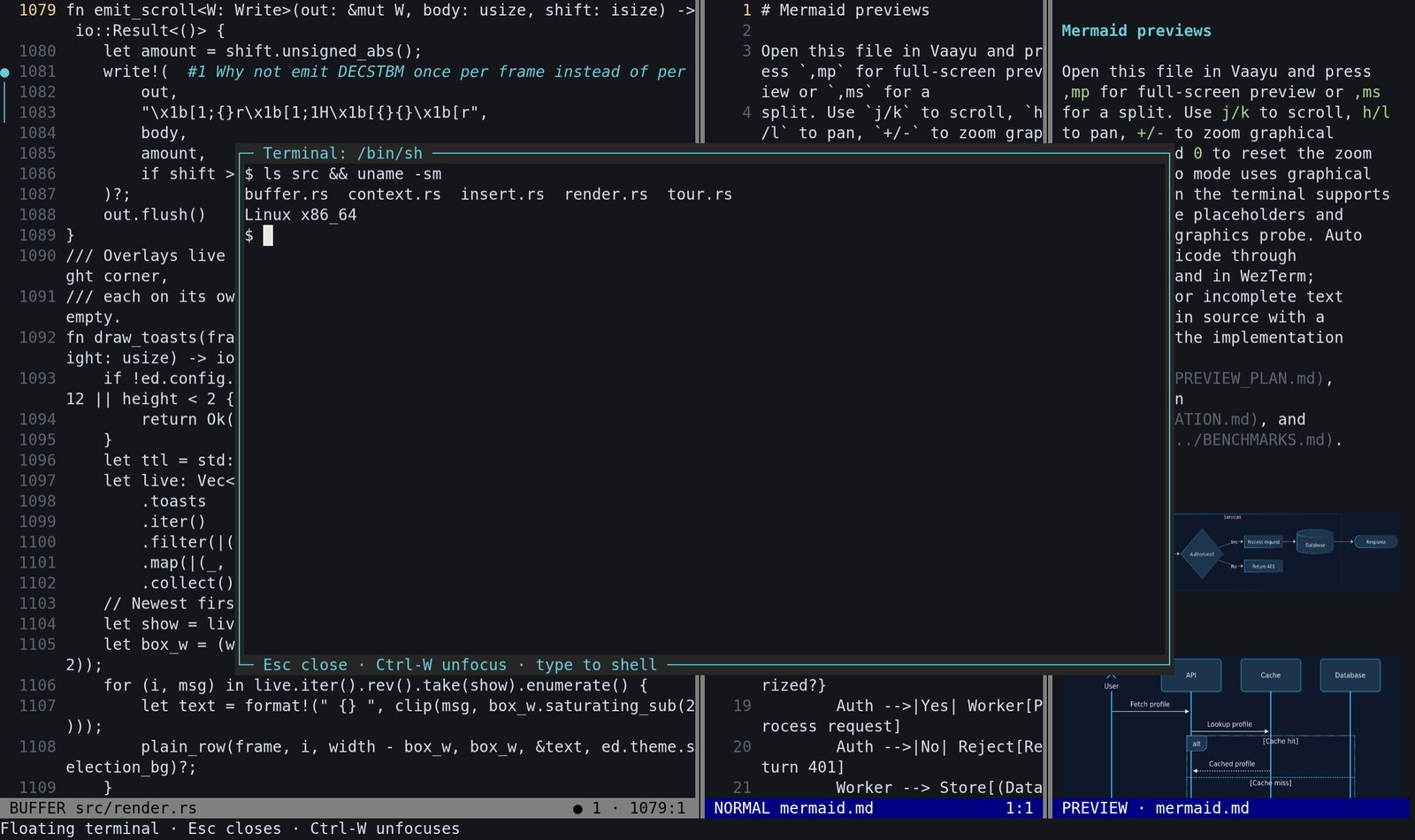
The same binary, in a Chromium tab: source with a review comment, a Mermaid preview with real images, and the floating terminal.
one trait
In part 3, the renderer produced bytes: escape sequences and text, row by row. The main loop doesn’t care where those bytes go. All it knows about its display is this trait, from src/frontend.rs:
//! What the main loop needs from the thing displaying the editor. Everything
//! above this line (dispatch, jobs, rendering) is shared, so the terminal and
//! the browser get the same editor and the same frames.

pub trait Frontend {
    type Output: Write;

    fn output(&mut self) -> &mut Self::Output;
    fn size(&self) -> io::Result<(u16, u16)>;
    fn poll(&mut self, timeout: Duration) -> io::Result<bool>;
    fn read(&mut self) -> io::Result<Event>;

    /// True once when the display lost its contents, so nothing already on it
    /// may be reused by the row diff.
    fn take_repaint(&mut self) -> bool { false }

    /// Runs once per frame and idle wake-up. True asks for a redraw.
    fn service(&mut self, _ed: &mut Editor) -> bool { false }
}
TerminalFrontend implements it with stdout and crossterm. The web frontend implements it with a WebSocket. run() is the same function for both. Every feature in this series (LSP, git, tours, terminals, Mermaid diagrams) works in the browser because none of them know it exists.
the data flow
 Browser tab                              Vaayu (one process)
 ───────────                              ───────────────────
 canvas grid  ◄── binary frame ──  writer thread ◄── per-tab queue ◄─┐
                                                                     │
 keyboard/mouse ── JSON event ──►  reader thread ──► crossterm Event ┴─► main loop:
                                                                        Editor + render::draw
Input. The page turns key, mouse, paste and resize events into small JSON messages. The server turns those into the same crossterm::Events a terminal would produce. Chords that a terminal sends as control bytes are normalized to how crossterm would have decoded those bytes. Keymaps, dispatch and mouse handling can’t tell the difference.
Output. Exactly the bytes the terminal would get, row diff and scroll reuse included. On average a frame is about 1.6 KiB, because only changed rows travel.
Size. In a terminal, the editor asks the kernel for the window size (an ioctl). In the browser there’s no such thing, so the page reports its grid size and cell size in pixels, and display.rs answers from that instead.
the page: a tiny terminal emulator
The browser side is one JavaScript file with no dependencies and no build step:
// The tab's half of `vaayu --web`. The editor itself runs on the server; this
// keeps a cell grid, applies the renderer's escape-sequence frames to it, paints
// changed rows on a canvas and reports input. There is no build step and there
// are no dependencies, so what is here is what the browser runs.
It understands only the small subset of VT escape sequences that Vaayu’s renderer actually writes: cursor movement, colours, attributes, scroll regions. It keeps the grid in typed arrays and paints only dirty rows on a <canvas>, one fillText per run of same-style ASCII characters, with box-drawing characters painted directly so borders line up exactly.
Two details that took real work:
- Character widths. If the server thinks
界is two cells and the browser’s font thinks it’s 1.8, everything after it drifts. So the server sends itsunicode-widthtable when the tab attaches, and the page uses that. A cell is exactly a cell on both sides. - Images. The page recognizes the same Kitty placeholder characters from part 8, and draws each one as a
drawImagecrop of the uploaded PNG. Because placeholders go through normal row composition, clipping and popups work in the browser exactly as in a terminal.
threads, not async
The server (src/web/server.rs) is plain std::net and threads, with tungstenite for WebSocket framing. No tokio, no async runtime. It serves a handful of sockets on loopback; it doesn’t need to be a web-scale server.
Each direction of a socket has its own thread. That matters: if a big frame (say, a full repaint with a few images) is on its way out, a keypress on its way in doesn’t wait behind it.
Sessions are built around the fact that tabs are disposable:
- Reloading or closing the tab keeps the session, including unsaved text. Attaching resets the frame cache, so the new tab gets a full repaint and its images again.
- One tab drives a session at a time. A newer tab takes over.
- If a tab falls more than 64 MiB behind (a backgrounded tab, a slow connection), it’s dropped and repainted when it comes back. Anything smaller that piles up is coalesced into one message.
All the HTML, CSS and JS are embedded in the binary with include_str!. No CDN, no network, works offline.
a localhost port that can run commands
This is the part I spent the most time on, and the part I’d most like people to read.
A server on 127.0.0.1 feels private. It isn’t. Every web page you visit can try to talk to it, and so can every other user on the machine. And this server can run shell commands (there’s a terminal in it). So it has three locks.
1. Host check, against DNS rebinding. An attacker’s page at evil.example can make its own domain resolve to 127.0.0.1 after the page loads, and then its requests go to your localhost with Host: evil.example. So the server only accepts a Host header that names a loopback address.
2. Origin check, against cross-site WebSockets. Browsers don’t apply the same-origin policy to WebSocket connections. Any page can open ws://127.0.0.1:PORT. But the browser does say which page is asking:
/// A browser names the requesting page in Origin; tools send none at all.
fn origin_allowed(origin: Option<&str>, host: &str) -> bool {
    origin.is_none_or(|origin| origin.strip_prefix("http://") == Some(host))
}
3. A random token. Startup creates a 192-bit token and prints a URL containing it. On the first request the token moves from the URL into a cookie, so it doesn’t sit in your address bar or history:
("GET", "/") if by_query => {
    // The cookie carries the token from here on, so it leaves the
    // address bar and browser history.
    let cookie = format!(
        "Set-Cookie: {}={}; Path=/; HttpOnly; SameSite=Strict\r\nLocation: /\r\n",
        shared.cookie, shared.token
    );
    respond(&mut stream_out, "302 Found", "text/plain", &cookie, b"")
}
HttpOnly means page scripts can’t read it; SameSite=Strict means other sites can’t make the browser send it. Tokens are compared in constant time:
fn tokens_match(a: &str, b: &str) -> bool {
    a.len() == b.len()
        && a.bytes().zip(b.bytes()).fold(0u8, |diff, (x, y)| diff | (x ^ y)) == 0
}
And the page itself runs under a strict Content Security Policy: no inline scripts, nothing loaded from anywhere but the server itself, no framing:
default-src 'none'; script-src 'self'; style-src 'self'; img-src data:;
connect-src 'self' ws://HOST; base-uri 'none'; form-action 'none'; frame-ancestors 'none'
--host lets you bind another address to use Vaayu across a network. Then the Host check can only validate the header’s shape, the Origin and token checks remain, and the traffic is unencrypted, so startup prints a warning. Use an SSH tunnel instead if you can.
how fast is it?
In headless Chromium, editing a ~5,900-line file, median / p95:
| Key | Terminal: first byte | Chromium: frame applied | Chromium: painted |
|---|---|---|---|
j | 1.43 / 1.62 ms | 2.2 / 2.8 ms | 11.6 / 12.9 ms |
Ctrl-F | 3.46 / 4.92 ms | 2.4 / 6.6 ms | 11.7 / 17.7 ms |
| typing | 2.26 / 17.39 ms | 3.7 / 18.3 ms | 11.7 / 28.0 ms |
“Painted” is ~12 ms almost regardless of the key, because the browser paints on the next animation frame. That’s the display’s refresh rate, not the editor. A full repaint of the grid costs about 3.8 ms of JavaScript in Chromium and 12 ms in Firefox.
The columns aren’t like for like (the terminal column stops before any terminal emulator has drawn anything), and it’s a single run, so read it as an order of magnitude.
the trade-offs
What you give up by drawing a cell grid instead of a DOM: no proportional fonts, no native text fields, no browser find-in-page. Browsers also keep Ctrl-W, Ctrl-T and Ctrl-N for themselves, so Vaayu uses Alt-W, Alt-T and Alt-N there.
What you get: every current and future feature, in the browser, for free, at the renderer’s own frame cost.
vs the alternatives
- code-server / VS Code in the browser: a whole IDE with a Node runtime, an extension host and a build pipeline. Much more capable as a web app. Much more to run.
- Neovim GUIs (Neovide, firenvim, the many web UIs): they speak Neovim’s UI protocol, which is designed for exactly this, and it’s the better-engineered approach. Vaayu just reuses its own terminal bytes, which needed no protocol design at all.
- ttyd / gotty: put any terminal program in a browser. That’s essentially what this is, but built in, aware of image placeholders and cell widths, with the session surviving reloads.
what I’d do differently
- Not much, and that’s the point of this post. The browser editor arrived seven weeks in, and on the Rust side the core change was a 61-line
Frontendtrait and 69 changed lines inmain.rs. That was only possible because every frame already went through one writer. If features had been allowed to write to the terminal directly “just this once”, this would have been a rewrite. The thing I’d do differently is say that rule out loud on day one, instead of getting lucky.
Next, part 10: git, GitHub, tests and tasks, inside the editor.